Chandigarh Visa Consultancy: A Visa Front Desk That Never Closes

Disclaimer: CodingCafe only built this website or app for a client. We are not part of that business and do not promote, endorse or recommend it. Any decision to use its services is your own. For bookings, orders, payments or refunds, please contact that business directly.
Industry

Visa & Immigration Consultancy

Services

Website DevelopmentCustom Website Development, UI/UX Design, Local SEO

Timeline

Under 1 Week

Choose the Country. The Website Handles the First Conversation.

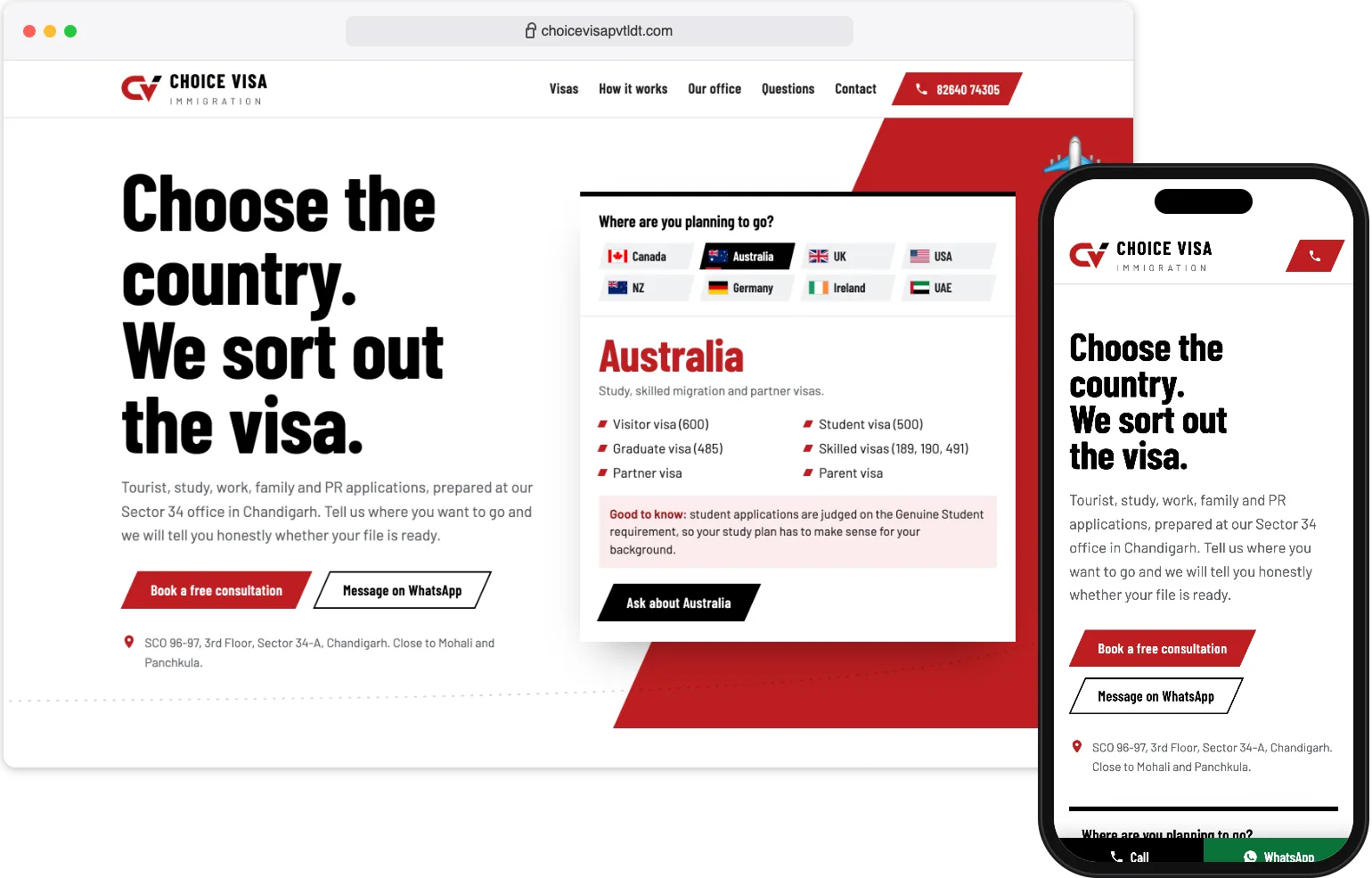
Our client runs a visa office in Chandigarh. CodingCafe built a fast single-page website that works like that front desk: pick a country, see the visas, learn what to bring, then book a free consultation or send the details on WhatsApp.

A new name with no reviews yet, and clients who would rather ask on the phone than visit.
A website that works like the front desk: pick a country, see the visas, reach a person in two taps.
100 out of 100 on all four Lighthouse checks on mobile. A 95 KB page with no requests to other sites.Lighthouse 12, mobile, tested 16 Nov 2026

About the Project

Our client is a young visa consultancy with an office in Chandigarh. Its clients come from across Punjab, Haryana and Himachal, and many of them start by phone rather than in person. They send documents on WhatsApp and ask their questions by phone.

So the website had to do what the front desk does. It needed to answer the first questions, give the address and hours, and make it easy to start a case without a visit.

Challenge We Tackled

A new business has no reviews yet, so the page sticks to plain facts: the address, the hours, and answers to common questions, such as whether any visa can be guaranteed.

The range was wide too. Eight countries and six kinds of visa can easily turn into a long, tiring page, and most visitors are on a phone, half ready to call instead of reading. The design had to let them find their own country in one tap and get to a person in two.

Our Approach

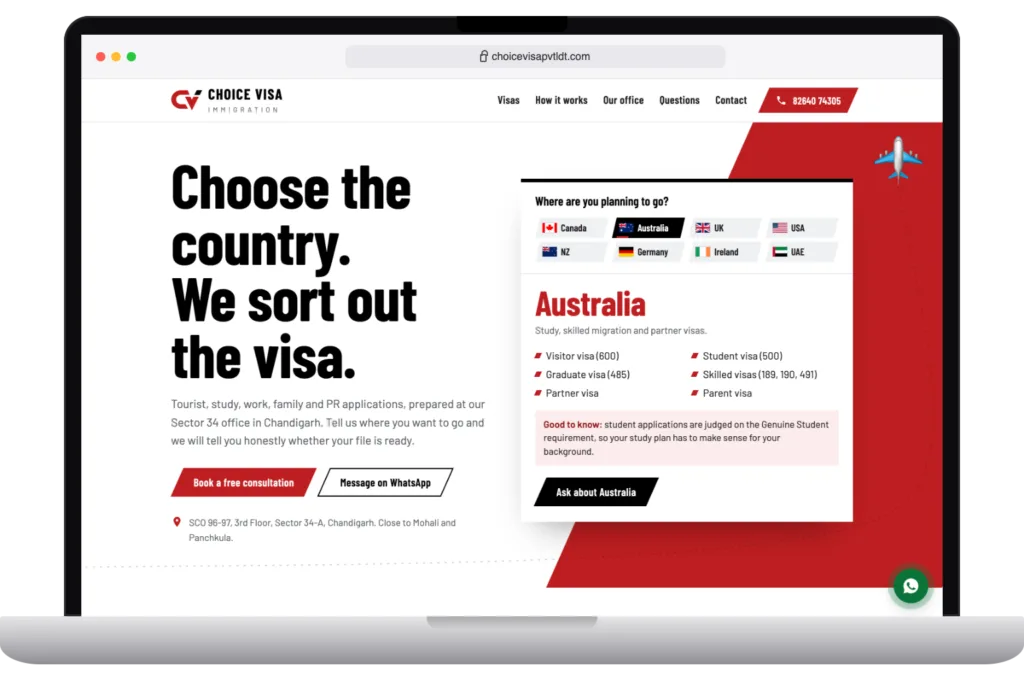
We put the most useful thing on the first screen: a country picker. Tap Canada and you see the visitor visa, study permit, Express Entry and super visa, a short “good to know” note, and one button to ask about that country.

The contact details are kept plain: a reception photo, the full address and hours, a “call before you come” button, and a questions section covering guarantees, past refusals and what can be done on WhatsApp.

Under the hood

  • Six visa types, each listing the documents involved.
  • A four-step path, with government fees shown apart from the office’s own quote.
  • If an enquiry email ever fails, the form offers WhatsApp with the details already typed.
  • Call and WhatsApp stay pinned to the bottom of the screen on phones.
  • Fonts are self-hosted and nothing loads from other sites.

What We Delivered

Country Picker Up Front

Eight countries on the first screen. One tap shows the visas on offer, a useful note and a button to ask about it.

What We Prepare, by Visa

Tourist, study, work, PR, family and business visas, each with its document list.

The Real Office, Shown

A reception photo, the office address, office hours, directions and a call-before-you-come button.

Front-Desk Answers

Answers to common questions on free consultations, guarantees, past refusals, IELTS and PTE, and doing it all on WhatsApp.

Form With a WhatsApp Fallback

If an email fails, the same enquiry opens in WhatsApp already typed, so no lead is lost to a mail problem.

Call and WhatsApp Bar on Phones

Both stay pinned to the bottom of the screen for visitors who would rather talk than type.

A Look at the New Experience

Chandigarh visa consultancy website on a laptop
Chandigarh visa consultancy website on a phone